
Guess Who's Back
After 2114 days, I’m back and will be starting to post again. So where did I go? ...
After 2114 days, I’m back and will be starting to post again. So where did I go? ...
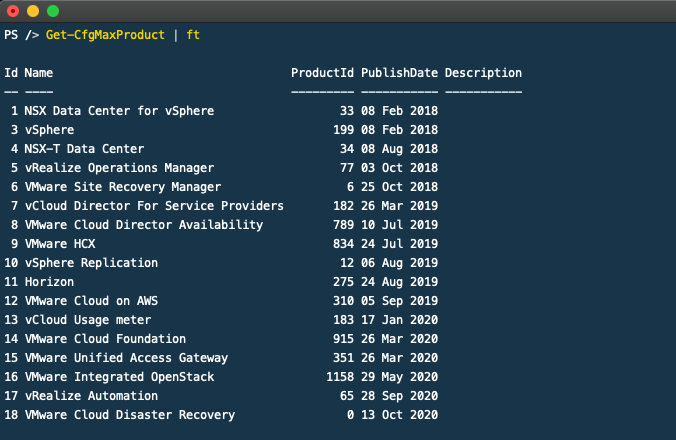
A couple of weeks ago when I was helping a colleague out with a script to count the number of DFW rules on a host , I needed to see what other (if any) configuration maximums had changed between 2 releases of NSX-T. If you take a look at the configmax site https://configmax.vmware.com , there is a link which will “Compare Limits” for you. And this allows you to choose the releases that you want to compare ...
Today I was asked for some help in figuring out the number of NSX-T Distributed Firewall rules configured for all filters on a given ESXi host. Why do we need to figure out this value? If you take a look at the configurations maximums page at configmax.vmware.com, you’ll see one of the NSX-T Configuration Maximums is the number of Distributed Firewall Rules per Hypervisor Host. Up until recently (NSX-T 3.0.2), this number had always remained the same at 10,000 and was something that you should monitor to make sure you remained within this (soft) limit. ...
As part of the NSX-T 3.0 release, an API only feature that I had discussed in a previous post, now looks like it has had the experimental flag removed, which means it is now a supported API. This is great news for those who were looking at this set of APIs and using it to prove that the dynamic group membership updates could now be sent to external systems for consumption. ...

Late last week, the latest version of NSX vSphere, 6.4.7 was released for General Availability (GA). Although it was mainly a maintenance release, there were a couple of items listed in the What’s New section of the release notes. I won’t list them all here, and instead I will just provide you with a link. https://docs.vmware.com/en/VMware-NSX-Data-Center-for-vSphere/6.4/rn/releasenotes_nsx_vsphere_647.html Once a NSX-v environment has been upgrade to 6.4.7, you may notice there will be a difference in how Distributed Firewall (DFW) rules will look on the dataplane when viewing them using the following command: ...
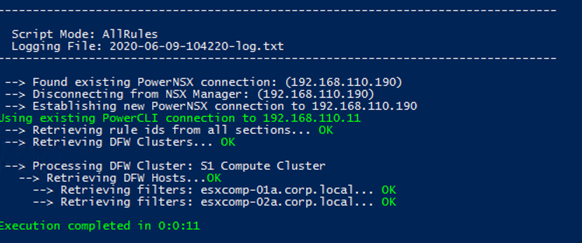
When working with a customer recently, there was a question raised about how to calculate the actual number of NSX-v distributed firewall rules configured for a given VM on the dataplane of an ESXi host. Whilst the short answer was to jump onto the console of the hypervisor or SSH into the host and look at the rules configured on the filter with the following command: vsipioctl getrules -f <filtername> Looks easy enough right? However, It didn’t really work in this specific customers environment as SSH and console access to the hypervisors was managed by a 3rd party and hence it was impossible for the customer to run the above command. ...
Recevied an interesting question today about whether a N-VDS supports the “Notify Switches” feature that is available in regular VDS. And as I didn’t know the answer to this off the top of my head, it was time to do some digging. First we needed an environment where I had a N-VDS configured, and it just so happened I had a 2.5.1 setup running. Jumping onto a host, first thing was to find what the N-VDS was actually called. ...
If you’ve heard me speak at VMworld on NSX Distributed Firewall best practises, you would have heard me speak about the importance of using the Applied To option when configuring DFW rules. One of the metrics using the Applied To option influences is the total number of rules configured per host. If you haven’t seen the VMworld session, I’ve uploaded it to YouTube for easier viewing - https://youtu.be/fX9pwiIeMps As per the published configurations on configmax.vmware.com, the maximum number of rules supported per host is as follows: ...
When working with a colleague recently on an NSX-T 3.0 environment that utilises VDS 7.0 rather than N-VDS, we came across something which initially stumped me. If you were to try and create 2 Distributed Port Groups with the same name on the same vCenter the following error is displayed, which is expected. So what would happen if we created a NSX-T Segment with the same name as one already created through vCenter? ...
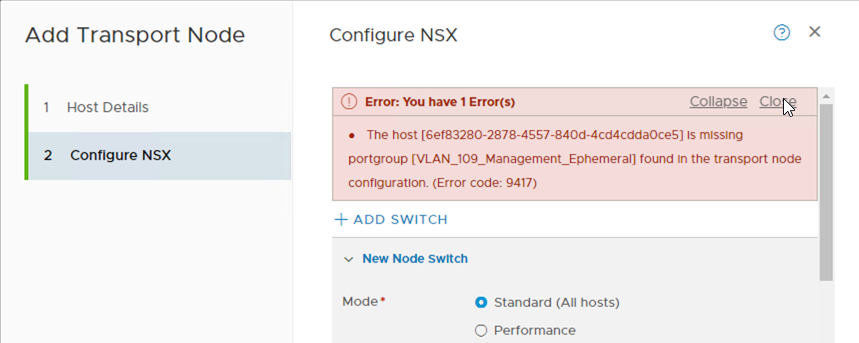
This is one of those pesky errors that I keep stumbling across, and every time It pops up, I forget how to fix it, so I am going to document it once and for all so that I can at easily find the fix for it. When adding a ESXi transport node into NSX-T and wanting to configure the vmk uninstall mappings (to handle removing the NSX-T VIBs and migrating the VMKernel interfaces back to a VSS/VDS), the following error sometimes appears. ...